
Monitoring OpenVMS Batch Jobs with a Watchdog Process
In many OpenVMS‑based industrial and real‑time environments, batch jobs are the backbone of data movement and process control. These routines—often written in VMS C++, BASIC, COBOL, or FORTRAN—run periodically and resubmit themselves to batch queues with a future start time. This self‑resubmission pattern is a common scheduling mechanism in process‑control systems.
But when a batch job fails and does not resubmit itself, the consequences can be significant:
- data files remain unprocessed
- downstream routines stall
- operators eventually notice missing or stale data
- the root cause is often discovered too late
To prevent this, a Batch Watchdog process continuously monitors the batch queues and alerts administrators when expected jobs are missing. This provides early warning of failures before they escalate into operational issues.
Why a Watchdog Is Needed
In real‑time industrial systems, batch jobs often:
- move data into or out of databases
- tidy or archive files
- trigger downstream routines
- perform periodic housekeeping
If any of these jobs disappear from the queue, the system silently drifts out of sync. The Watchdog solves this by:
- scanning the batch queues at a fixed interval (default: hourly)
- comparing the active jobs against a reference list
- reporting any missing jobs to OpCon and a designated administrator
This ensures that operational issues are caught early, not after data loss or user complaints.
How the Watchdog Works
The Watchdog is implemented as a DCL batch job (BATCH_WATCHDOG.COM) that resubmits itself to a dedicated queue, see Figure 1. Its workflow is straightforward and reliable, see Diagram 1.
1. Prevent Multiple Instances
A lock flag ensures only one Watchdog is running at a time.
2. Schedule the Next Run
The script calculates the next execution time and resubmits itself to the WATCHDOGS batch queue. Adjusting the interval is as simple as modifying this section of the command file.
3. Capture Current Queue State
A SHOW QUEUE command is executed and the output is written to a temporary file.
4. Normalise the Running Jobs List
The job names are extracted, converted to lowercase, and sorted using standard VMS sort order.
5. Prepare the Expected Jobs List
The reference file (BATCH_JOBS.DAT) is processed into the same normalised format as the live queue list.
6. Compare Expected vs. Actual Jobs
Two nested loops perform the comparison:
- Outer loop: reads each expected job name
- Inner loop: scans the running jobs list to find a match
7. Handle Missing or Present Jobs
If a job is missing:
- A notification is sent to OpCon
- A log entry is written to
BATCHLOG.LOG - Processing continues with the next expected job
If a job is present:
- The Watchdog moves on to the next expected job
8. End of Expected Jobs List
Once all expected jobs have been checked, the loops exit.
9. Cleanup
Temporary files are removed and the running‑lock flag is cleared.
System Setup
1. Create the WATCHDOG User
Use AUTHORIZE:
ADD WATCHDOG /PASSWORD= -
/DEVICE=SYS$USER -
/DIRECTORY=[WATCHDOG] -
/OWNER="WATCHDOG BATCH" -
/ACCOUNT=SUP
The WATCHDOG user (and the user who initially launches the job) must have:
CMKRNLSYSNAMSYSPRVOPER
These privileges are required for queue inspection and system‑level operations.
2. Create the Watchdog Directory
Create a directory such as:
SYS$SYSROOT:[WATCHDOGS]
Copy BATCH_WATCHDOG.COM and BATCH_JOBS.DAT into this directory, then set ownership:
SET SECURITY/OWNER=WATCHDOG
3. Create the WATCHDOGS Batch Queue
INIT/QUEUE/BATCH/START WATCHDOGS
4. Start the Watchdog
SET DEFAULT SYS$SYSROOT:[WATCHDOGS] @BATCH_WATCHDOG
The job will now resubmit itself at the defined interval.
Monitoring the Batch Queues
Before starting the Watchdog, ensure that all real‑time batch jobs have executed at least once and resubmitted themselves to their queues. If the Watchdog starts too early, it will report false positives for jobs that simply haven’t run yet.
Once active, the Watchdog continuously monitors the queues and reports missing jobs at each interval. This provides operators with timely alerts and helps maintain the integrity of real‑time data flows, see Figure 2.
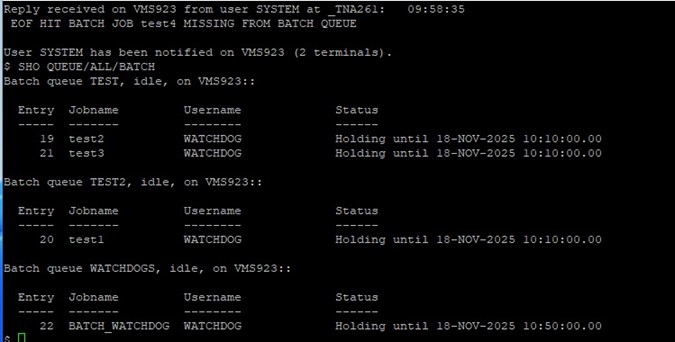
Figure 1
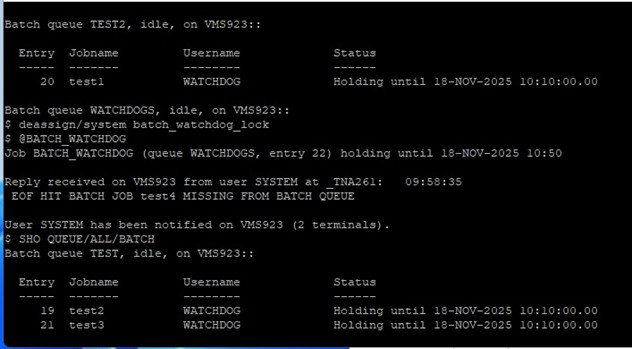
Figure 2
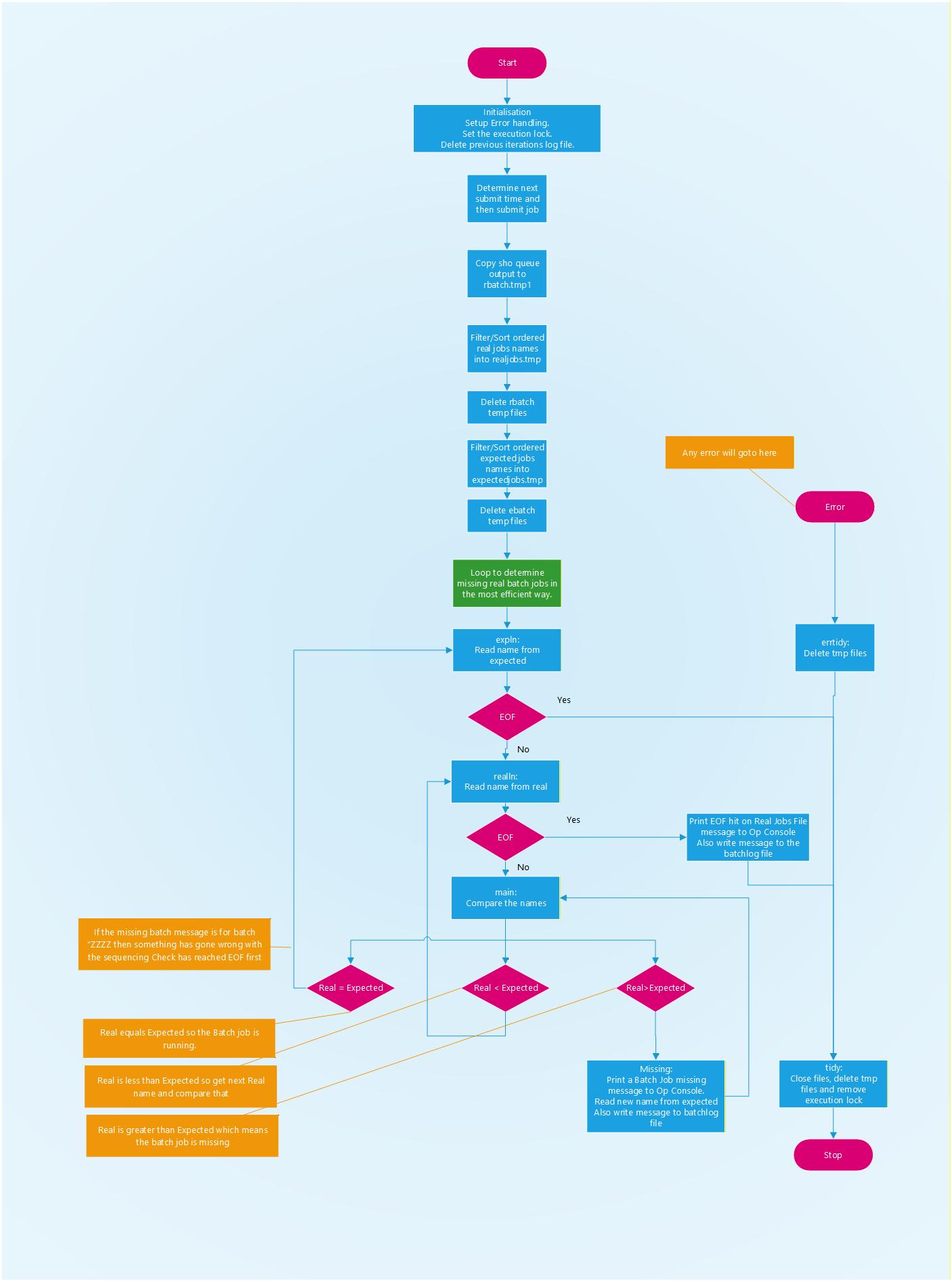
Diagram 1